
Aged Care Clinical Note
0.1.0-preview - Preview
Aged Care Clinical Note - Local Development build (v0.1.0-preview) built by the FHIR (HL7® FHIR® Standard) Build Tools. See the Directory of published versions
| Page standards status: Informative |
This section outlines typical scenarios that lead to the creation of aged care clinical note documents. It aims to provide readers with context and background to help them understand the purpose, usage, and potential future applications of aged care clinical note documents.
This section is not exhaustive and does not include deviations or fringe examples but is provided to better position the reader on the potential application of aged care clinical note documents.
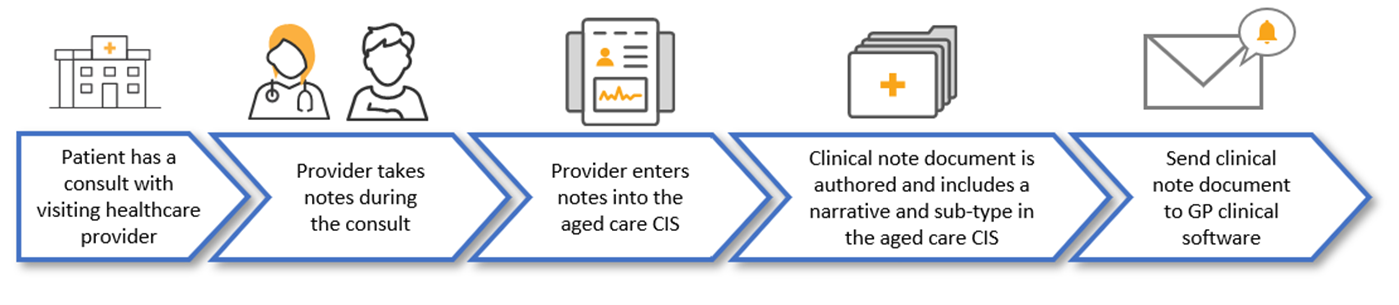
Dr Randal has an agreement to attend a RACH on a regular basis and consults with multiple residents there. On this occasion Dr Randal visits Mr Peterson for a routine consult. During the consultation, Dr Randal takes notes regarding Mr Peterson’s weight and blood pressure.
After finishing her rounds, Dr Randal enters the notes from the consultation into Mr Peterson’s electronic record in the aged care CIS.
Dr Randal needs to send the notes to her GP clinical software. Dr Randal includes a narrative (the human-readable, textual content within a clinical document, often rendered for viewing and understanding by healthcare professionals) and selects an optional sub-type (e.g. summary note - sub-type selection allows for further classification of type of information). Dr Randal then authors the clinical note document on the aged care CIS and sends the authored clinical note document to her GP clinical software using existing point-to-point transfer mechanisms.
| Step 1 | Dr Randal completes a consultation with patient Mr Peterson and produces notes during the consult. |
| Step 2 | Dr Randal enters the notes into the aged care CIS. |
| Step 3 | Dr Randal selects an optional sub type. |
| Step 4 | Dr Randal authors the clinical note document in the aged care CIS. |
| Step 5 | Dr Randal sends the authored clinical note document to her GP clinical software using existing point-to-point transfer mechanisms. |
(PDF files are commonly used as attachments to provide a human-readable version of the content, alongside the structured XML data. These PDF attachments are often used for diagnostic reports or other clinical documents where the original format is crucial for interpretation.)
Dr Randal has an agreement to attend a RACH on a regular basis. Dr Randal consults with multiple residents and has a routine consultation with Mr Peterson. During the consultation, Dr Randal takes notes regarding Mr Peterson’s weight and blood pressure.
After finishing her rounds, Dr Randal returns to her GP clinic and enters the notes from Mr Peterson’s consultation into her GP clinical software.
Dr Randal needs to send the notes to the aged care CIS at Mr Peterson’s RACH. Dr Randal authors the clinical note document on the GP clinical software and attaches a PDF. Then, using existing point-to-point transfer mechanisms, sends the authored clinical note document to the aged care CIS.
| Step 1 | Dr Randal completes a consultation with patient Mr Peterson and produces notes during the consult. |
| Step 2 | Dr Randal enters the notes into her GP clinical software. |
| Step 3 | Dr Randal authors the clinical note document in her GP clinical software. |
| Step 4 | Dr Randal attaches a PDF to the clinical note document. |
| Step 5 | Dr Randal sends the authored clinical note document (with PDF attachment) to the aged care CIS using existing point-to-point transfer mechanisms. |

Dr Randal visits the RACH and attends to Mr Peterson as part of a multidisciplinary care plan review. During the consultation, Dr Randal takes notes regarding Mr Peterson’s weight and blood pressure.
Dr Randal then enters the notes from Mr Peterson’s consultation into the aged care CIS.
Dr Randal needs to send the notes to her GP clinical software and to Dr Smith as part of a multidisciplinary care plan. Dr Randal authors the clinical note document on the aged care CIS. Then using existing point-to-point transfer mechanisms sends the authored clinical note document to Dr Smith and her own GP clinical software.
| Step 1 | Dr Randal completes a multidisciplinary care plan review with patient Mr Peterson and produces notes during the consult. |
| Step 2 | Dr Randal enters the notes into the aged care CIS. |
| Step 3 | Dr Randal authors the clinical note document in the aged care CIS. |
| Step 4 | Dr Randal sends the authored clinical note document to her clinic using existing point-to-point transfer mechanisms. |
| Step 5 | Dr Randal sends the authored clinical note document to Dr Smith’s clinic using existing point-to-point transfer mechanisms. |

Mr Peterson has a planned transfer from his current RACH to another RACH closer to where his daughter lives. Bill is a nurse at the RACH and is the responsible staff member on duty. He reviews the clinical information in the aged care CIS to send to Mr Peterson’s new RACH. Bill includes Mr Peterson’s recent clinical information and his strict dietary needs.
Bill authors the clinical note document on the aged care CIS and attaches any relevant information associated with the transfer e.g. dietary requirements, medication charts and recent blood test results. Bill uses existing point-to-point transfer mechanisms to send the clinical note document to the receiving RACH system. Bill also sends the authored clinical note document to Mr Peterson’s usual GP.
| Step 1 | Mr Peterson has a planned transfer to another residential aged care organisation. |
| Step 2 | Bill, the responsible staff member on duty, reviews clinical information in the aged care CIS. |
| Step 3 | Bill authors the clinical note document and attaches relevant information associated with the transfer. |
| Step 4 | Bill sends the authored clinical note document and attachments to the receiving aged care CIS using existing point-to-point transfer mechanisms. |
| Step 5 | Bill sends the authored clinical note document and attachments Mr Peterson’s usual GP using existing point-to-point transfer mechanisms. |

Mr Peterson requires an after-hours consultation with a GP. The responsible staff member on duty facilitates a phone call with Dr George, an after-hours GP that Mr Peterson has not seen before. Mr Peterson attends a telehealth consultation with Dr George. During the consult, Dr George takes notes regarding Mr Peterson’s health.
Dr George enters the notes from Mr Peterson’s telehealth consultation into his GP clinical software.
Dr George needs to send his notes to the aged care CIS and to Mr Peterson’s usual GP. Dr George authors the clinical note document on the GP clinical software then, using existing point-to-point transfer mechanisms, sends the authored clinical note document to the aged care CIS and to Mr Peterson’s usual GP.
Bill is the responsible staff member on duty at the RACH and reviews the clinical note document received from Dr George and feels confident in actioning documented instructions that confirm those discussed in the telehealth consultation.
| Step 1 | Dr George completes an after-hours phone consultation with Mr Peterson and produces notes during the consult. |
| Step 2 | Dr George enters the notes into his GP clinical software. |
| Step 3 | Dr George authors the clinical note document in his GP clinical software. |
| Step 4 | Dr George sends the authored clinical note document to the aged care CIS and Mr Peterson’s usual GP using existing point-to-point transfer mechanisms. |
| Step 5 | Bill, the responsible staff member on duty at the RACH, reviews and actions the clinical note document received. |

IG © 2025+ Australian Digital Health Agency. Package au.digitalhealth.r4.agedcareclinicalnote#0.1.0-preview based on FHIR 4.0.1. Generated 2025-12-05
Links: Table of Contents | QA Report | Version History | Report an issue or propose a change
